We can't find the internet
Attempting to reconnect
Something went wrong!
Attempting to reconnect
Analysis Summary
Performed authenticity
The deliberate construction of "realness" — confessional tone, casual filming, strategic vulnerability — designed to lower your guard. When someone appears unpolished and honest, you evaluate their claims less critically. The spontaneity is rehearsed.
Goffman's dramaturgy (1959); Audrezet et al. (2020) on performed authenticity
Worth Noting
Positive elements
- This video provides valuable real-world benchmarks for the Snapdragon 8 Elite's x86 emulation performance and introduces viewers to the Game Native/GameHub software ecosystem.
Be Aware
Cautionary elements
- The video minimizes the extreme thermal and software stability hurdles, making a highly experimental 'tinkerer' project look like a polished consumer product.
Influence Dimensions
How are these scored?About this analysis
Knowing about these techniques makes them visible, not powerless. The ones that work best on you are the ones that match beliefs you already hold.
This analysis is a tool for your own thinking — what you do with it is up to you.
Related content covering similar topics.

Transcript
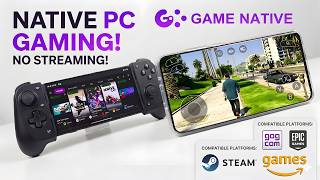
This handheld can run PC games, but it's not like the Steam Deck or even the ROG Ally. And that's because it doesn't run Windows or Steam OS like those others. This is actually an Android powered handheld. It's really an Android tablet. It's the Lenovo Legion Y9, the 2025 model, with the Snapdragon 8 Elite, and I've paired it up with the Lenovo G9 controller, which basically turns this specific tablet into a handheld gaming machine. In this video, we're going to be taking a look at some PC game emulation on Android with this setup here, and I've been doing a lot of testing with Game Native and GameHub. I've been seeing some really great performance. This is the 16 gig version of the Lenovo Legion Y700 Gen 4. So, it's the 2025 model. Again, we've got that Snapdragon 8 Elite. And if you take a look around back with the G9 controller, there's actually a little cutout. It does come with a section that'll go in place of this, but this is really for an external cooler because when you're emulating PC games on something like this, it can get warm. It doesn't have its own active cooler built in. So, once we move over to some higherend games, I will add my own cooler to this because it will help out. It gets pretty warm. But, I'm going to be using GameHub here for this. But, you can also go with something like Game Native. Super easy to use. It allows you to log into your Steam account, download your games, download your saves. You can even import games here. It works with Steam, GOG, and Epic at the time of making this video. And another great thing about Game Native is it'll automatically download preconfigured settings for your device. Most of the time they work. Sometimes I run into it and it doesn't work. But for this one, I'm going to be using GameHub because I've had this set up on a couple different devices. So, it's pretty easy for me to kind of go into ADB and get everything transferred over to another device. I don't have to go back and redownload a bunch of games. For this, we're going to start out pretty easy. When it comes to 2D games on Steam and indie games, a lot of this stuff is going to be compatible and it will work on lower-end chipsets like let's say the Snapdragon Gen 1. But then when you start going up to the newer AAA games, you will need something a bit more powerful. And I think that's kind of the big issue right now, and it has been for a long time with Android. Fragmentation. There's just so many different devices from different manufacturers. They use different amounts of RAM, different CPUs. You can buy a $25 Android phone and you're not going to get great performance out of x86 emulation on something like that. But if you move over to a higherend device, you could definitely see much better performance. But I do believe that we'll see better optimizations for a bunch of different devices down the road. It's still pretty early for, you know, playing your favorite PC games on Android. This is not cloud gaming. This is not streaming. We are emulating these games on this Android device. The next game we have here is an older one, but it's one of my favorites. I've got Dirt 3 up and running here at 60fps, ultra settings. And I'll show you from our settings. We'll go to graphics. We're at 720p. And it still looks great on a smaller display like this, ultra. And you can see that it's running really well. In fact, if I unlock the frame rate here, it'll jump up to around 80fps. But one issue that a lot of people are running into with x86 emulation on Android is thermal throttling. And this device is no exception. And I mentioned a cooler earlier in the video. Right now, we're not using it, but about 4 minutes into gameplay with an older game like this at ultra, it'll start thermal throttling that CPU. So, the clocks on the GPU and CPU dip down so it can cool itself off. In turn, we're not seeing In turn, we're not in turn, we're not seeing max performance that it is. So, I've seen it dip into the 40s once this thing hits thermal throttle. And that's where an external cooler comes in really handy. So, I've been using these for quite some time. They're like 20 bucks over on Amazon. It's basically a thermoelectric cooler or a Peltier cooler. Basically, one side extracts the heat out of the other, and this side over here gets super cold, actually below freezing. This specific model will reach -4° C, so it will keep this tablet nice and chilly. And with the G9 controller, we've got that cutout around back, so it just makes it really easy for mounting this up so I can keep it cool and get maximum performance out of this thing. Now, it's time to move over to some higherend games. And the first one I wanted to take a look at was Cyberpunk 2077. Recently on the channel, I tested this on the new Snapdragon 8 Elite Gen 5 and the Red Magic 11 Pro. That's got a built-in uh air cooler and liquid cooler. It's still thermal throttles, but I can reach over 60 fps with it using FSR frame gen. Unfortunately, on all of the Snapdragon 8 Gen1 chips, I can only reach up to like 42 FPS. And I find that locking it at 30 fps is kind of the way to go. So, I'll show you 720p. I'm at low settings right now. I've got FSR enabled and I've got FSR frame gen on. The frame rate is locked from GameHub. And one thing I've noticed when doing this is it usually kind of locks it at like 29. So, every once in a while you will see it jump up to like 31, but with it locked down it's a pretty smooth experience. And again, this is not cloud gaming. We're not streaming this. Cyberpunk 2077. My Steam version of the game is being emulated on this ARM CPU. Pretty amazing to see this happening. These are just kind of the first steps of this. It's only going to get better from here. And I do believe even on this chip, we'll be able to run something like Cyberpunk 2077 at 60fps once more optimizations come for Proton. And thanks. Fallout 4 is one that I've been able to get up and running on Android for quite some time using another application known as Win Later. It's been working pretty well inside of GameHub and Game Native. This is the GOG version. I've not had great luck going with the updated Steam version. So, this is the older GOG game of the year Fallout 4 version here. And it's so close to running at 60fps. I mean, we're up in the uh mid50s with it. And I'm at medium settings, 720p with Fallout 4 here. Spider-Man Remastered is another one that I was able to get up and running, but FSR Frame Gen isn't working in this game, and I've tested it on a few different devices. I also tested out Spider-Man Miles Morales. This one does seem to perform a little better. Frame rate is unlocked right now, and you can see we're still not really over 30 with it. So, I usually just limit the frame rate to 30 fps from GameHub to make it feel a bit smoother because with the unlocked, it does feel a bit choppy. I also wanted to show off GTA 5. We're at 720p normal settings. And on the Snapdragon 8, I do consider this a pretty playable experience. The first few explosions that you experience, you might get some stuttering, but it kind of irons itself out after that. And I have seen some people online running this at 60 or even over 60 on the Snapdragon 8 Elite. Not exactly sure what settings they're using there. There it is. That stutter with the explosions, but I'm at normal 720p and we're just using the stock preset inside of GameHub. And finally, The Witcher 3. And throughout the video, all of the games that you saw running are kind of curated. I've gone through and I've tested like 40 different games. Those are the games that I was able to get up and running pretty decently. But there's a ton of games that just wouldn't start up no matter what I was doing using GameHub or Game Native. And that's just kind of how it is right now with x86 emulation on Android. It's not perfect. It's not going to be for everybody, but I do think that in the near future. This is how a lot of us are going to be playing games on the go. I do see this kind of snowballing. Again, it's just the beginning right now, and as soon as more developers jump in, we're going to see some pretty massive increases in performance. Overall, I've been having a lot of fun with this, and I have been testing lower-end chipsets like a older Snapdragon 1, Gen 2, even something like the Snapdragon 865. It seems that using like game native with some uh easier to run 2D, easier to run 2D and indie games, even the Snapdragon 865 does run pretty decently with like Silkong, Hades 2, some easier to run games like that. But in order to get these AAA games up and running, you know, at higher frame rates, you will need a little more power at the time of making this video. And I think that's where all of the optimizations are going to be coming in down the road. But if you're interested in testing this out on your device, I will leave links in the description to Game Native. You can pick it up over on GitHub, and it's just the easiest way to get up and running with x86 emulation on Android right now. You could also go with GameHub, but keep in mind it does require almost every permission in the book for Android. So, I usually use a burner account with it. So, I would definitely suggest checking out Game Native. And if you do get some games up and running, let us know in the comments below what device you're using and what games you got running at a decent speed. And don't forget to leave your specs, the CPU, and especially your RAM amount because like I mentioned at the beginning of the video, these can use quite a bit of RAM. And like a 16 gig unit that I've been testing out is using 80% of the RAM there. 12 gig seems to get you by pretty decently also, but let us know for sure. But that's going to wrap it up for this one. If there's any other devices or games you want to see running with something like this, let me know in the comments below. And like always, thanks for watching.
Video description
In this video, we’re pushing Android to its absolute limits by emulating full x86 PC games on the new 2025 Lenovo Legion Y700 Gen 4! Powered by the Snapdragon 8 Elite and 16GB of RAM, I paired this Android tablet with the Lenovo G9 controller to see if it can rival handhelds like the Steam Deck and ROG Ally. We test out performance using Game Hub, Game Native, and Winlator to run major AAA titles directly on Android—no cloud gaming, no streaming. From indie games to Cyberpunk 2077, GTA V, and Fallout 4, we'll see exactly what this chipset can handle, how to bypass thermal throttling with a Peltier cooler, and why this might be the future of mobile gaming. Buy The Lenovo Legion y700: https://ebay.us/d4vDH7 Buy The Lenovo G9 Controller Here: https://ebay.us/8qnc19 Get Game Native Here: https://github.com/utkarshdalal/GameNative Follow Me On Twitter: https://twitter.com/theetaprime Follow Me On Instagram: https://www.instagram.com/etaprime/ Vip-URCDKey 25% code for software: ETA Windows 11 Pro Key($25):https://biitt.ly/RUZiX Windows 11 Home Key($23):https://biitt.ly/SQKqi Windows 10 Pro OEM Key($20):https://biitt.ly/KpEmf Windows10 Home Key($17):https://biitt.ly/2tPi1 Windows 10 LTSC 2021 Key($15): https://biitt.ly/W564e Office 2019 pro key($63):https://biitt.ly/o0OQT 2016 pro key($32): https://biitt.ly/xWmvn Buy Windows 11 Pro Key at: https://www.vip-urcdkey.com DISCLAIMER: This video and description contains affiliate links, which means that if you click on one of the product links, I’ll receive a small commission at no extra cost to you! 00:00 - Emulating PC Games on Android 01:05 - The Hardware: Lenovo Legion Y700 (2025) & G9 Controller 01:38 - Software Setup: Game Hub vs. Game Native 03:10 - Dirt 3 Performance (60 FPS Ultra) 04:19 - Beating Thermal Throttling with External Coolers 05:08 - Testing Cyberpunk 2077 (FSR & Frame Gen) 06:25 - Fallout 4 Gameplay (GOG Version) 07:00 - Spider-Man: Miles Morales 07:38 - GTA V on Snapdragon 8 Elite 08:26 - The Witcher 3 & Final Thoughts on Android Emulation THIS VIDEO IS FOR EDUCATIONAL PURPOSES ONLY!