We can't find the internet
Attempting to reconnect
Something went wrong!
Attempting to reconnect
Analysis Summary
Ask yourself: “Did I notice what this video wanted from me, and did I decide freely to say yes?”
Performed authenticity
The deliberate construction of "realness" — confessional tone, casual filming, strategic vulnerability — designed to lower your guard. When someone appears unpolished and honest, you evaluate their claims less critically. The spontaneity is rehearsed.
Goffman's dramaturgy (1959); Audrezet et al. (2020) on performed authenticity
Worth Noting
Positive elements
- Provides a very specific, hands-on technical guide for partitioning and cloning NVMe drives in Ubuntu for AI-specialized mini-PCs.
Be Aware
Cautionary elements
- The 'revelation' framing makes a standard hardware upgrade feel like a proprietary secret, which may lower the viewer's critical assessment of the risks involved in opening $3,000+ hardware.
Influence Dimensions
How are these scored?About this analysis
Knowing about these techniques makes them visible, not powerless. The ones that work best on you are the ones that match beliefs you already hold.
This analysis is a tool for your own thinking — what you do with it is up to you.
Related content covering similar topics.
Transcript
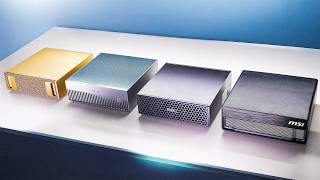
These are GB10 machines. Asus GX10. There's a Dell GB10. There's the MSI Edge Expert. There's a Nvidia DGX Spark. There's a bunch of them. I don't even have all of them. But even though they share the same exact chip, memory, 128 gigs of memory, same board, they have slightly different cooling solutions. And one of the more important things that you might care about, especially if you're going to be experimenting with these and loading larger models, you're going to need some space. And some of these, like the Asus GX10, come with either 1 TBTE SSD, 2 TB, or four. Others, like the Dell and the DGX Spark, only come with 4 TB. And this right here is a 4 TBTE SSD. Actually, this is just a box. The SSD itself is pretty small. It's this size. This is called a 2242 size and it's the size of the SSD that's inside these boxes. Now, why should you care about this? Well, if you want to buy one of these devices, the prices are not cheap. 4,000 bucks for the DJX Spark with 4 TB. The Lenovo ThinkStation PGX, which I don't have here. 3,500 bucks for the 1 terbte version. 4,000 bucks for the Dell. Wait, that's the 1 TB version. 4 TB is $4,700. $5,100 for the HPZGX 4 tab. So, yeah, the 4 TBTE models fetch a lot. What about the 1 TBTE ones? Well, here's ThinkStation PGX. This one is 1 TB and it's $3,500. Here's MSI Edge Expert. The box I have here. Wait, where's the price? Oh, you can't buy it on their website. Let's see. MSI official store. Go there. Product not found. Um, go back. It says it would be $4,000. Walmart has these, but the cheapest that I found is the 1 terbte version of the Asus GX10. That's the one that I happen to have right here. It's $3,000. Still a big chunk of change, but it's not 4,000. It's not 5,000 yet. Still, you might want to have some more memory in there. Let's quadruple the space inside that box. But not only that, we're also going to change from Gen 4 to Gen 5. Huh. Giving us a little bit of that boost for loading the models faster. Now, unfortunately, at this time, the small form factor that I have here, the 2242s, don't come in 8 TBTE versions, but these do. This is the full 2280 size. Holy moly. $1,600. 1,500 for the Samsung. Even $1,000 seems like quite a lot to pay for an 8 TB drive, but that's I guess how much they are now. This one is the Gen 4. That's why it's only a,000. Only a,000. But I have this two TB version here. And if it works on this size drive for a 2 TB, it's going to work for an 8 TB. Might as well try it. To get into the ASUS box is pretty easy. This one's different than the other ones because they've done something really clever. If you're buying more than one of these, I don't have more than one to demonstrate to you, but I do have this. I've taken the bottom off. If you bought more than one of these, these little feet are magnets, so they can just stack and they attach to each other like that. Very clever. This one is also much heavier than the other GB10 machines that I have. And that's because they have extra heat pipes to draw that heat away from the central processing unit. They also have a sevenstage fan system in there instead of the typical five stage. So, they've done some clever stuff here. There's the SSD right there. It's the 2242 and it's got a Fisen controller. That's the Gen 4. Now, the 4 TBTE version of the GX10, I believe, comes with the Gen 5 controller, but the 1 TB comes with the Gen 4 until we uh upgrade it. Now, how am I going to upgrade it? There's no way to copy from this drive to this drive. Well, I bought a little device that'll let me do that. There's actually a bunch of these available on Amazon, but I decided to go with this one. I think it's because I got a bunch of UG Green things, and this is UG Green. Not sponsored. This one's rated pretty nicely. It's 58 bucks. It's not the cheapest one, but I figured I could probably get some use out of it. This is labeled as A and B. Your source drive has to go in slot A. And your destination, which will be formatted and erased, so make sure there's uh nothing valuable on there. Your target is going to go into B. And then you just push this button right here. This took probably about 15 minutes. It goes through the percentages, 25%, 50, 75, and then 100. And then it's finished. And when it's done, you have a nice little ready device. So I've already done that. I'm going to show you how that looks. But what I haven't done yet is a longer one. So, I'm going to do that right now. 1 2 3. Starts blinking. And go. Maybe it's not going to work, huh? Oh, and go. There it is. It's copying. Nice. Let's leave that alone for a while while it's copying. And I'm going to get back into this. And here I'm just going to insert the new NVME, which is an exact clone. But there is a little bit of an issue. The original SSD was partitioned and the partitions got cloned over. But what happens with the extra 3 TB? The partition is not automatically going to be extended. Let's plug this in and see what happens. So these days I'm always flipping between models. GPD for research, cloud for coding, Nano Banana for image generation, VO cling, and runway for video. Six tabs, six bills, and counting. Enter chat LLM teams. One dashboard houses every top LLM and route Olympics the right one. GPT Mini for ultra fast answers, Claw Sonnet for coding, Gemini Pro for massive context. They recently added Gemini 3 and GPT 5.1 the moment they dropped. Create professional presentations with graphs, charts, and deep research detailed content. Need human sounding copy? Human eyes rewrites text to defeat AI detectors. Need visuals? Pick Frontier or open- source models. Nano Banana, Midjourney, Flux for images, Magnific for upscaling, plus VO, WAN, and Sora for video all builtin. You also get Abaca's AI deep agent to pretty much do anything. build full stack apps, websites, reports with just text prompts and deploy them on the spot. They have Abacus AI Desktop, which is the brand new coding editor and assistant that lets you vibe code and build productionready apps. And the kicker, it's just $10 a month, less than one premium model. Head over to chatlm.abacus.ai or click the link below to level up with Chat LLM Teams. Here we go. Login screen. This is really cool. My old passwords, everything still works. Everything is still there. If I could remember the password. There it is. There's the background. Everything is still exactly as I left it on the other machine. But if we go to the terminal and go to DF-H, you'll see that we only have 916 GB on the main partition. But if I go to utilities and then discs, it says it's a 4 TBTE disc. And it identifies it's a Corsair MP700 micro. By the way, I linked to that down below if you want to check it out. I'll also leave an affiliate link to the cloning device if you are curious about that. Here's the EFI partition. Here's the root partition, which is 1,00 GB. And there's our three terabytes of free space. Ah, so much space. What are we going to do with it? But hold on, that's not the only fun thing. I'm going to go to my code folder. And I have this little NVMe gen shelf script that I wrote that identifies the controller generation. And there it is. Gen 5 32 gig transfers per second. So, not only did we upgrade the amount of space, we upgraded the speed of this drive too. And that translates directly to model load time as I showed in my previous video where I compared all the GB10s. Now, what are we going to do with this space? Well, we can keep it as separate and have a separate partition where we keep models for example that we download or we can extend the root partition onto it. I'm going to click resize here and this is the current size. Free space following is 3,000. I'm just going to drag this out. Resize. Boom. We have a 4 TBTE partition, folks. Let's go back here to our little screen. df-h. Wa! Look at that. 3.6 terb. Now I can fit a lot of models on there. A lot of models. Now, this drive I bought at MicroEnter. Not sponsored, but it was 494 bucks. They could have price matched probably, but on Amazon right now it's $484. Again, I'll leave a link to this. But if you add 3,000 plus4 or 500, that's $3,500. This right here is now the cheapest 4 TBTE GB10 device out there. That could be the title of my video. Hey, look. This is done. Very hot though. Now, do I recommend you doing what I'm about to try? No. Don't do this. That's why I have a YouTube channel so I can do stupid things. Let's take this guy out. And I'm going to stick this in here, but obviously that's that's not something you should be doing. It's going to be sticking out like that. Now, if you really wanted to, you can get one of these risers for the M.2 NVME drive, and then just kind of wrap it around, reposition the drive somewhere so it fits inside the case, and it's not as sloppy as sticking out here. That's an option, but don't do it. It's ugly. It's messy. So, I'm going to keep this thing upside down. Now, theoretically, you could maybe do a little 3D printed thing here and little things here if you really needed 8 terb, but then you can also get an external enclosure, right? So, I'm going to keep this thing upside down. If this works, I'm just going to be really impressed. Okay, here we go. Turning it on. Look at this. It's It's not I've been trying to resolve that this is new hardware. It's just like, oh, air. We're back to normal. Let's go. It's just powering on into Ubuntu. Business as usual. I cannot believe that. That just works now. It's ugly. Very ugly. That is crazy. Let's go with DFH. And of course, this is going to show 916. Let's check out our disc. 2 TBTE WD Black with one free terabyte of space. It just works. So, theoretically, if I had the $2,000 or $1,600, whatever it is to spend on an 8 TBTE SSD, which I don't, that's just nuts. I have this one laying around. So, this is a good example of what could be done with a 2280 if you really, really wanted to do that, but don't. It works. I just wish the prices were back where they were 6 months ago. But this also means that you can upgrade your DGX Spark, your Dell, your MSI box. You can upgrade them all because they all have that 2240 drive. You can upgrade them to 8 TB. I'm getting some ideas. Anyway, if you missed that video where I'm comparing these and performance for AI, watch that right over here. Thanks for watching and I'll see you next time.
Video description
I took the “cheapest” GB10 box (Asus GX10) and pulled a storage move that changes what these DGX Spark–style machines are actually worth. Try out ChatLLM - http://chatllm.abacus.ai/ltf and Abacus AI DeepAgent - http://deepagent.abacus.ai/ltf 👀 MSI EdgeExpert now available here: https://amzn.to/40luUHG 👀 ASUS GX10: https://amzn.to/4kROLb8 👀 NVME Duplicator: https://amzn.to/4qL9qyA 👀 2242 Micro NVME SSD: https://amzn.to/4tRBVha My USB-C portable hub: https://amzn.to/4kw0hrf 👀 My favorite external drive (dependable): https://amzn.to/3Os9Wi3 👀 Thunderbolt 4 dock: https://amzn.to/3yVRicC 👀 Thor on NVIDIA Marketplace: https://bit.ly/44j0acY 👀 Spark and Thor on Amazon: https://bit.ly/4pCjBpJ 👀 M4 Pro Mac Mini deal: https://amzn.to/3Mw8dNx ⚡ *Other gear I use:* https://www.amazon.com/shop/alexziskind 🎥 Related Videos 🎥 🧬🐍 Mac Studio CLUSTER vs M3 Ultra 🤯 - https://youtu.be/d8yS-2OyJhw 🧳🧰 Mini PC portable setup - https://youtu.be/4RYmsrarOSw 🍎💻 Dev setup on Mac - https://youtu.be/KiKUN4i1SeU 💸🧠 Cheap mini runs a 70B LLM 🤯 - https://youtu.be/xyKEQjUzfAk 🧪🔥 RAM torture test on Mac - https://youtu.be/l3zIwPgan7M 🍏⚡ FREE Local LLMs on Apple Silicon | FAST! - https://youtu.be/bp2eev21Qfo 🧠📉 REALITY vs Apple’s Memory Claims | vs RTX4090m - https://youtu.be/fdvzQAWXU7A ⚡💥 Thunderbolt 5 BREAKS Apple’s Upcharge - https://youtu.be/nHqrvxcRc7o 🧠🚀 INSANE Machine Learning on Neural Engine - https://youtu.be/Y2FOUg_jo7k 🧱🖥️ Mac Mini Cluster - https://youtu.be/GBR6pHZ68Ho * 🛠️ Developer productivity Playlist - https://www.youtube.com/playlist?list=PLPwbI_iIX3aQCRdFGM7j4TY_7STfv2aXX — — — — — — — — — ❤️ SUBSCRIBE TO MY YOUTUBE CHANNEL 📺 Click here to subscribe: https://www.youtube.com/@AZisk?sub_confirmation=1 Join this channel to get access to perks: https://www.youtube.com/channel/UCajiMK_CY9icRhLepS8_3ug/join — — — — — — — — — 📱LET'S CONNECT ON SOCIAL MEDIA ALEX ON TWITTER: https://twitter.com/digitalix — — — — — — — — — #dgxspark #nvidia #llm