We can't find the internet
Attempting to reconnect
Something went wrong!
Attempting to reconnect
Analysis Summary
Performed authenticity
The deliberate construction of "realness" — confessional tone, casual filming, strategic vulnerability — designed to lower your guard. When someone appears unpolished and honest, you evaluate their claims less critically. The spontaneity is rehearsed.
Goffman's dramaturgy (1959); Audrezet et al. (2020) on performed authenticity
Worth Noting
Positive elements
- This video provides detailed technical insights into the performance of AMD's Strix Halo architecture and unified memory behavior under Linux, which is rare for pre-release hardware.
Be Aware
Cautionary elements
- The 'revelation framing' (e.g., 'what we were always promised') creates an emotional high that may lead viewers to overlook the 'troubleshooting simulator' reality of running bleeding-edge Linux drivers.
Influence Dimensions
How are these scored?About this analysis
Knowing about these techniques makes them visible, not powerless. The ones that work best on you are the ones that match beliefs you already hold.
This analysis is a tool for your own thinking — what you do with it is up to you.
Related content covering similar topics.

Transcript
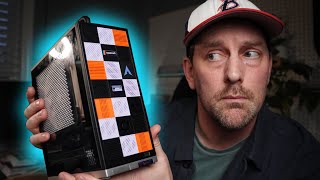
Every year, every year, every year, the joke goes, "Is it finally the year of the Linux desktop?" Well, this is the first machine that I've used where I'm really starting to think that that might actually be true. When I first got my hands on this platform in laptop form, I felt it to my core. or AMD calls it the Ryzen AI Max Plus 395. 16 cores, surprisingly powerful GPU and in this case, 128 GB of unified memory. That's the number that has been turning a lot of heads, especially with AI entrepreneurs and AI experimenters. But even with that much memory, this thing is a monster monster machine. A small form factor desktop, 128 GB of unified memory. Yeah, that's the number that's been running around everybody's heads, especially AI experimenters, AI shenanigans. But even if you don't need that much memory, this thing is still a monster in a small form factor desktop case. It's purrred like a kitten. So, inside here is actually a standard ITX motherboard. So, this fits in a huge variety of cases. If you just want to order the motherboard, Framework has added an overkill 400 watt power supply to this case. Technically, this idles under 10 watts, as low as seven. If you get creative with power management in Linux, you get 5 gig Ethernet, dual USB 4, HDMI display port, two PCIe Gen 4 M.2 with built-in heat sinks, and even a Gen 4 X4 slot with 25 watts of power delivery. Now, the Framework Desktop case doesn't actually really let you have room to use that X4 slot, but if you put this motherboard in any other ITX case, you will have room. And no, it's not enough that a big desktop GPU is going to slide in there, but we'll look at external GPU options later. The front also has these customizable tiles that are 3D printable. And uh they sent me one that was a grass tile so I could touch grass. So I designed my own 3D printable planter tile where I can literally touch grass. Take that framework. Let's start with performance. The CPU in here is a 16 core. It's a Zen 5. It's it's similar to a 9950X desktop Zen 5, but unlike a desktop, it is a quad channel memory configuration. The memory is not upgradeable though, but it does give you around 200 gigabytes per second of memory bandwidth. That's Thread Ripper levels of memory bandwidth in this tiny little package. That's double what you get, more than double really, from Desktop Zen 5. We're working inside a 140 watt power envelope with this CPU. And that power envelope means that our performance can approach a 9950X. Now 950X is still going to boost higher and be better overall, but 80 to 90% for single and multi-thread workloads for the AI uh 395 Max Plus. Yeah, it's going to completely obliterate older like AM4 5950X. Anything older than that is completely outmatched. Now, unlike a desktop Zen 5 CPU, we've only got 12 lanes of Gen 4 bandwidth to work with. That's our two M.2s plus the the uh the X4. We've also got some USB 4 bandwidth. Those are dedicated into the into the CPU, so that's nice. is mostly Gen 4. Let's talk about the GPU performance. The built-in GPU is the Radeon 860S. This is new for the platform. It's unique and it's important. Think roughly equivalent to Nvidia's RTX 4060. Very respectable performance. 1440p, 60 fps, and 1080p titles. Totally doable. And because it's a GPU that's baked right into the CPU, that means that driver and Linux plumbing and support and Mesa and all that kind of stuff is way better than what you would get from a hybrid graphics setup. Steam on Linux, of course, is a first class citizen these days. Hell Divers 2 actually plays better on here than on Windows. Linux's anti-che solution in Hell Divers 2, let's just say, is more sane. And if you look closely at Mango HUD in our gameplay B-roll overlay, you'll see something really interesting. Only 512 megabytes of VRAM is reserved. Yeah. Instead of pre-allocating four or eight or 16 or 32 GB of 128 gigs for VRAM up front, the system just takes what it needs from the pool of 128 gigs of system memory. That has been the promise of unified memory for years. But now it's finally working the way that we were always promised with the latest Linux drivers and what AMD has done and everything else. Now Framework also supports Windows on this and you should check out our other review if you're interested in that. But Framework also supports Linux distros like Basite and Ubuntu and Fedora. For my own testing and because this platform is so bleeding edge, I like to run Arch or at least an Archbased DRO. If you don't want to go the full by hand Arch route, Cachi OS is a great option. You still get the Arch ecosystem, but the install and setup are pretty easy, and you get a lot of it makes sense if I want to run Steam and play games defaults uh built in out of the box. So, that's nice. Other than this 128 GB config, Framework has two other configurations, the 64 GB configuration and the 32 GB configuration. The 64 gig config is an excellent Linux workstation option that can also game. This is also fine as a starting point for this platform, and you can do some AI stuff. The 128 gig model for AI and serious other compute work makes a ton of sense. Of course, that's what we're testing. But the 32 gig model is harder to recommend that. I'd probably skip it since the memory is not upgradeable and 32 gigs is just too limiting long term. And given the availability of other upgradeable ITX boards, like you could, you know, 7840 HS or something like that with slotted DDR5. Yeah, just do that. I mean, 32 gigs with double the memory bandwidth, like you're you're losing the benefit of having the faster memory when you don't have the capacity, you see. So, I don't I don't know that that makes sense. And that kind of leads us to AI workloads. This is where it gets fun. There are three main ways to run AI workloads on this platform. And this is not necessarily true for Halo. This is just, you know, something you should know. First is the brute force path, the CPU. You got 16 Zen 5 cores in here. You got AVX 512. The AVX 512 implementation in here is the best in a consumer CPU. And you got 200 GB per second of memory bandwidth. That's as much as TRX50. That's enough to run quantized models, even very large ones. And we have guides for that and other videos that we've done on the forum. The second path for AI is that 8060S APU. It can be used for compute and large language models and everything else. Firstly is the Vulcan backend, and that's often the fastest option. In my testing with OpenAI's new 120 billion parameter model, Vulcan matched or beat other options for letting that model run on this platform at 30 tokens a second. Well, 33 actually. Just dropping this model at the beginning of of August. It had day zero support on this platform running unmodified with Vulcan. We're talking that 120 billion parameter model from OpenAI out of the box day zero. It's incredible. And that's all thanks to the Vulcan backend. keep in mind. And just to be clear, Vulcan isn't Rock. Vulcan is the graphics compute API. Rockom is AMD's full machine learning stack. They overlap, but they're fundamentally different animals. That brings us to Rockom. Rockom is designed for AMD's CDNA GPUs, not RDNA. Uh now, RDNA is the 8060S that's in here. Uh support for RDNA has come a long way in Rockom the last 6 months. If you need Rockom at work, this is an affordable dev platform compared to cloud instances with CDNA access. And the framework forums have some excellent posts tracking model performance and setup steps. The software is moving very very fast here. You should check out our guides and the rock GitHub repository and lots of required reading in the issue tracker. If you decide to go down this path, uh there's a guy in the framework forum, LHL. He's got a great thread on all the different performance here. And I've had a fun time playing troubleshooting simulator, sort of following the work that he did and setting it up on my own and getting even better performance than what he reported on in the frameworks forum. Then there's the unhinged option hybrid setup. I've got an Nvidia SFF4000 ADA GPU that's here. So you can connect this to that with USB 4 or even Oculink. Now in this enclosure it's USB4 and USB4 is half the speed of Oculink but uh it's doable and with this option this is the SFF4000. This is a 20 gig VRAM GPU. So with this setup you can split the workload between Vulcan or Rockom and let the Nvidia GPU do the dense layers and the KV cache and prompt processing. But the model like the 120 billion parameter model or even a 500 billion parameter model will run on both of these. And the combined package power here is on the order of 250 watts. This is sort of the ultimate mini CUDA plus Rockm Dev Lab. And the amount of compute in this is is kind of ridiculous. You got 148 gigs of VRAM total 128 plus 20. And as a micro lab for doing things with both CUDA and Rockom, well, I mean, it's hard to beat it because it's portable and it's nice and it's just this is exactly the kind of setup that I want personally for a personal AI. Think Po from Altered Carbon meets Home Assistant without ridiculous uh, you know, heat and power requirements or cooling requirements. If this tickles your I must have it box, then you belong on the level one text forums. And that's where we've got the ride up on setting up exactly this to be able to run a 500 billion parameter model and 128 gigs of memory plus 20 gigs of VRAM and you get 40 tokens per second. Your chariot does a weight. Framework's ITX board is a winner. And I love how cute the little framework desktop case is with its modular front IO and the highly customizable front panel and all the general thoughtfulness that they've added to their platform. It's like, hey, I want an SD card reader in the front. They can do that. There's at least 10 other stricts Halo mini PCs out there, mini PC designs, but this one is got it's it's got all the flexibility. You can do the external GPU support, the USB 4 support is a standout. Even just AMD's APU design here, just taking that into account, it could disrupt markets because it's a smart buy for a lot of use cases. I mean, think about it. Why make lower-end desktop CPUs when an APU like this, but let's say A8 or 12 cores and you know a different version slightly? You can get all this work done with a lower component count. The main problem facing AMD with Stricks Halo and Rockom is that Rockom is designed for CDNA, not RDNA. And Rockom has got to be more turnkey. But the momentum behind Rockom is building further and faster than anything I've ever seen. And it's only accelerating. AMD has made tremendous strides in the last year with Rockom and especially the last six months and they they've got to keep going though. They can't slow down. We need more. AMD must not slow down. We need more Rock of Maturity. Well, it's definitely true that Vulcan is the easier path forward for accessing all of the compute that's here. Oh, and speaking of accessible compute, there's a 50 tops NPU in here as well. So maybe that's an option when the all the AVX 512 is busy on the CPU side and all the GPU is busy with its wave matrix multiply AD. You still got that 50 tops NPU. Oh, there's other one other thing that I should talk about the BIOS. It is de facto the most well put together BIOS of literally any other six Halo platform because it's inside. Inside is frameworks BIOS framework. See what I did there? And it's great. So, if you're thinking of buying this, it's really just a choice between the 128 gig version and the 64 gig version. And that's pretty much it for this one. Congratulations to Framework and the Framework team. There's always room in the market for earnest thoughtfulness and careful consideration. With this, you could build the ultimate home assistant plus poe machine or you could have the ultimate AI lab or you can do something offscript. It's a lot of fun. You could check out Jeff Gearling's channel where he built a cluster out of these. also doable. Wildly impractical perhaps, but a lot of fun. Great learning exercise. And 128 gigs is nothing to uh sneeze at if you have hay fever and need to touch grass. I hope this is level one. If you have any questions or you have a workload you want to put one of these things through, hit me up in the forum and probably work that out. I'm signing out. I'll see you there. [Music]
Video description
Framework isn't just making laptops anymore! Now they are making very small desktop pc too! Check out Wednell's fun with Linux. Thank you framework for sending us this lovely piece of kit! https://frame.work/desktop Check out the forum here: https://forum.level1techs.com/t/the-ultimate-arch-secureboot-guide-for-ryzen-ai-max-ft-hp-g1a-128gb-8060s-monster-laptop/230652?u=autumn 0:00 Intro 0:22 AMD Ryzen AI Max+ 395 1:07 What's in the Desktop 2:05 CPU Performance 3:09 GPU Performance 4:30 The Linux I Used 4:51 Other Configs 5:43 AI Workloads 9:36 Wendell's Endorsement? 10:56 NPU and BIOS 11:30 Conclusions ********************************** Thanks for watching our videos! If you want more, check us out online at the following places: + Website: http://level1techs.com/ + Forums: http://forum.level1techs.com/ + Store: http://store.level1techs.com/ + Patreon: https://www.patreon.com/level1 + L1 Twitter: https://twitter.com/level1techs + Wendell Twitter: https://twitter.com/tekwendell *IMPORTANT* Any email lacking “level1techs.com” should be ignored and immediately reported to Queries@level1techs.com.